Apple Developer Account Verification: Requirements and Documents
If you are preparing to publish an iPhone or iPad app, Apple Developer Account Verification is one of the most important steps between creating an Apple Account and becoming an active Apple Developer Program member. Apple needs to establish who is enrolling, whether the applicant can enter a legal agreement, and—when a company is applying—whether that organization is a genuine legal entity.
The good news is that verification becomes much more manageable when you prepare the correct information in advance. An individual developer generally needs accurate legal identity and contact details and may need to provide a government-issued photo ID. A company needs additional information, including its registered legal name, D‑U‑N‑S Number, organizational website, work email, and an authorized representative.
This 2026 guide explains the Apple Developer account verification requirements, the documents you should have available, the individual-versus-company differences, the enrollment process, common reasons for delays, and safe ways to get help. It also separates Apple’s official membership fee from third-party service prices so you can plan your budget without confusion.
Apple Developer Account Verification Checklist: The Quick Answer
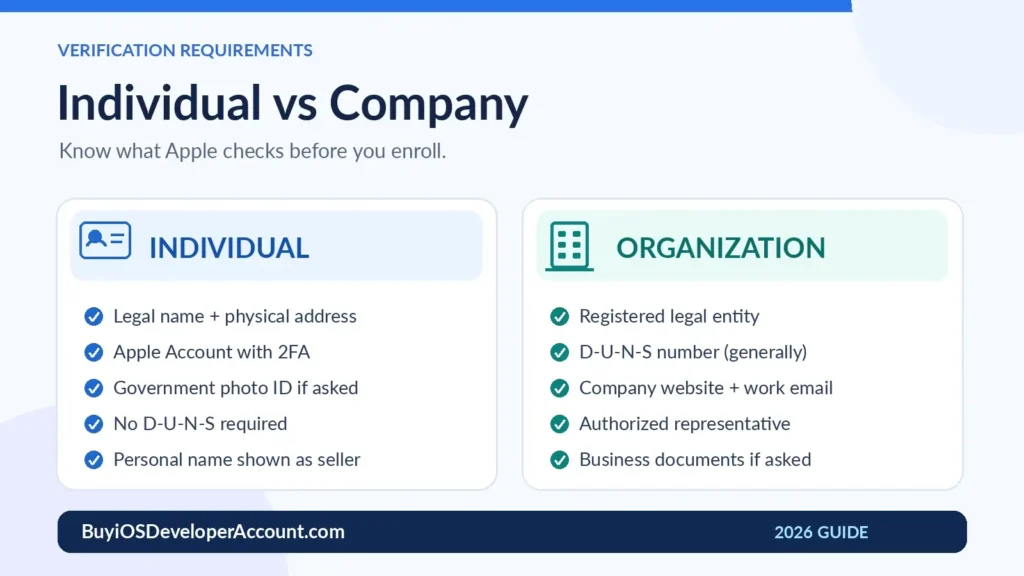
Before you begin, use this simple Apple Developer Account Verification Checklist. Apple may request more or fewer supporting documents depending on your region, enrollment route, and circumstances.
| Requirement | Individual or sole proprietor | Company or organization |
|---|---|---|
| Apple Account with two-factor authentication | Required | Required for the enrolling representative |
| Legal name, reachable phone, and physical address | Required | Representative’s legal identity plus company details |
| Government-issued photo ID | May be requested; typically part of in-app ID checks | May be requested for the representative |
| Registered legal business entity | Not required | Required |
| D‑U‑N‑S Number | Not required | Generally required; government organizations are an exception |
| Company work email and functioning website | Not an organizational requirement | Required |
| Authority to sign legal agreements | Applicant signs personally | Applicant must have authority to bind the organization |
| Additional incorporation or registration documents | Usually not applicable | May be requested, including notarized copies in some cases |
Important: This is a preparation checklist, not a promise that every applicant will be asked for the same files. Follow the exact instructions displayed by Apple or sent by Apple Developer Support. Apple’s official identity-verification guidance is the controlling reference.
What Is Apple Developer Account Verification?
Apple Developer account verification is the process Apple uses to validate an applicant’s identity and, where relevant, an organization’s legal existence and the enrolling person’s authority. It is associated with enrollment in the paid Apple Developer Program and can also apply when an existing membership undergoes a significant change.
A free Apple Account lets you access some developer resources, but it is not the same as an active, paid membership that enables App Store distribution and program features. To enroll in the paid program, you must meet Apple’s requirements, accept its agreements, and complete applicable verification and payment steps.
Three different checks can become part of the experience:
- Identity verification: Apple checks the real person responsible for the membership against valid details and, where required, government identification.
- Organization verification: For company memberships, Apple checks the legal entity using the registered business name, D‑U‑N‑S data, contact information, and potentially supporting business paperwork.
- Authority and compliance checks: Apple may confirm whether the representative can legally sign for a company and may later request separate compliance documentation in App Store Connect.
A successful verification does not guarantee that a future app will pass App Review. Account enrollment and app approval are different processes, each with its own rules.
Individual Apple Developer Account Verification Requirements
An individual membership is generally appropriate for freelance developers, students who meet the applicable age requirement, independent creators, and sole proprietors or single-person businesses. With this membership type, your personal legal name appears as the seller name on the App Store, not an informal brand name.
1. An Apple Account with two-factor authentication
Create or use an Apple Account that you control. Ensure two-factor authentication is turned on and that its legal name, email, trusted phone number, and other contact details are current. Apple’s enrollment requirements also state that applicants must have reached the legal age of majority in their region.
If you enroll using the Apple Developer app, Apple provides specific device and account prerequisites. You may need to use the same eligible iPhone, iPad, or Mac throughout the enrollment flow, install the latest Developer app, and be signed in to iCloud. Check Apple’s latest in-app enrollment instructions before starting.
2. Your full legal name and real address
Enter your name exactly as it appears on your official identification. Do not put a nickname, project name, agency name, or company trading name into the first-name or last-name fields. Supply an address where you can accurately be contacted; Apple does not accept P.O. boxes as an enrollment address.
Small inconsistencies are easy to overlook. For example, a middle name, punctuation variation, or an outdated address can cause a manual review. Review all details before pressing Submit.
3. Government-issued ID, when requested
Apple can request a government identification number or a photo of an identity document. In the Apple Developer app, identity verification may involve photographing a valid government-issued photo ID. Passports are accepted in most regions, while eligible alternatives such as driver’s licenses vary by region.
Make sure the document is valid, readable, unaltered, and genuinely yours. Use only Apple’s authorized submission workflow. Do not send passport scans or one-time verification codes to an unrelated vendor or person who contacts you unsolicited.
4. Consistent payment information
Apple’s published enrollment instructions caution that a person enrolling as an individual with a credit card should use their own card when that payment method is offered. Using somebody else’s card can trigger additional identity checks and delay enrollment. Available payment options vary by region and enrollment route.
Individual document preparation: Keep your passport or other accepted ID nearby, have an accurate personal mailing address and reachable telephone number, and be ready to follow any additional verification request. A business registration certificate and D‑U‑N‑S Number are not standard requirements for an individual membership.
Company Apple Developer Account Verification Requirements
Company or organization enrollment lets eligible businesses publish apps under the legal organization’s name and add team members with appropriate roles. However, the review is more involved because Apple must verify both the business and the person acting on its behalf.
1. A recognized legal entity
The company must be capable of entering legal contracts. Apple does not accept a mere trading name, DBA, fictitious business name, or branch as the enrolling entity. The exact legal entity name submitted to Apple should match your formal registration and D‑U‑N‑S record.
For preparation, keep documents such as a certificate of incorporation, business registration certificate, or equivalent legal-entity documentation available. Apple may ask for supporting records, but not every applicant must upload every possible document at the start.
2. The correct D‑U‑N‑S Number
A D‑U‑N‑S Number is a unique nine-digit business identifier issued by Dun & Bradstreet. Apple uses it to verify your company’s identity and legal status. It is normally required for companies and educational institutions; government organizations are an exception to the general requirement. Individuals do not need one.
If your business already has a D‑U‑N‑S Number, use the number tied to the same legal name and headquarters address as your Apple enrollment. If there is no match, correct the Dun & Bradstreet record rather than entering an unrelated organization’s number. You can use Apple’s official D‑U‑N‑S lookup and request guidance.
3. Business address, telephone, website, and work email
Apple expects organizations to provide a headquarters address and contact number, a working public website, and a work email address associated with the company’s domain. A social-media page, placeholder landing page, or parked domain does not satisfy Apple’s stated website requirement.
An effective website should make it reasonably clear who the business is, what it does, and how it can be contacted. This is practical preparation, not a formal promise that a particular website layout will secure approval.
4. A person with signing authority
The enrolling person must have legal authority to bind the business to Apple’s agreements—for example, an owner, founder, appropriate executive, or authorized employee. Apple may request contact details for another person who can confirm this authority, particularly when the applicant is not the founder or owner.
Do not ask an unauthorized contractor to enroll in the company’s name. Apple may contact the reference or organization directly, so make sure the people involved know an enrollment is under way.
5. Additional business documents, if Apple asks
Some companies are asked to provide formal registration paperwork, documents reflecting a legal-name change, or notarized copies that certify the originals. Required paperwork and notarization rules can depend on the jurisdiction and the exact issue Apple is reviewing. Have clear, recent legal records ready, but submit documents only when and where Apple requests them.
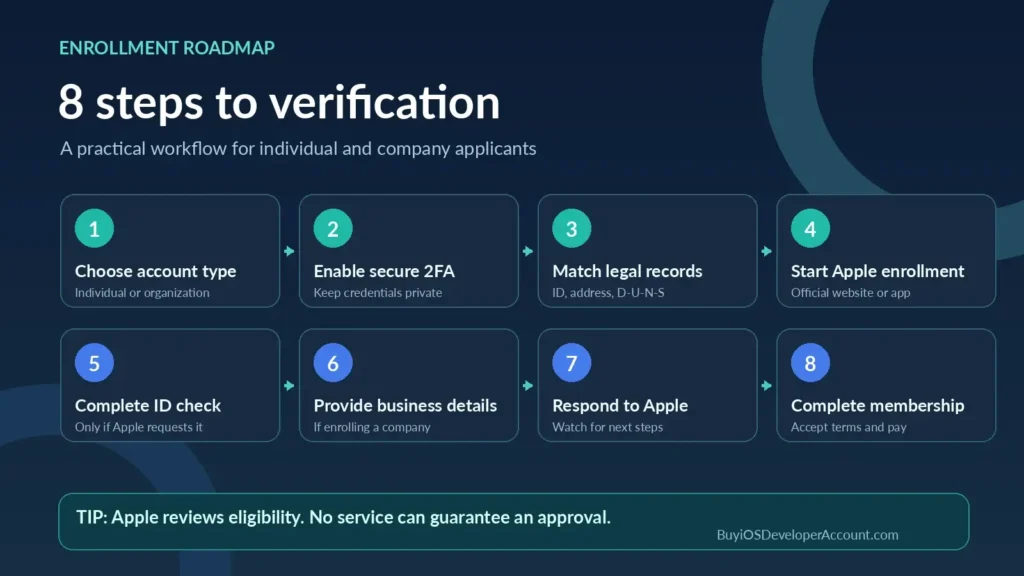
How to Complete Apple Developer Account Verification: Step by Step
You can start enrollment through Apple’s program enrollment page or, where supported, through the Apple Developer app. The on-screen flow can differ for individuals and organizations, but the underlying preparation is similar.
Step 1: Choose the correct membership type
Decide whether to enroll personally or as a genuine legal organization. This matters because the seller name and required verification evidence differ. A sole proprietor normally selects Individual; an incorporated company with an appropriate legal entity can generally seek organization enrollment.
Step 2: Secure your Apple Account
Turn on two-factor authentication and verify that you can access the trusted phone number and devices attached to your account. Do not share your account password, security code, recovery details, or private verification messages with an intermediary. Your own authorized Apple Account is the foundation of a safe enrollment.
Step 3: Match personal and business records
Compare the legal name and address in your Apple Account with your ID. If applying as a business, check that your registration details and D‑U‑N‑S record are consistent. Resolve obvious discrepancies before submitting an application rather than hoping Apple will overlook them.
Step 4: Open Apple’s official enrollment flow
Sign in to Apple’s developer website or supported Developer app. Review the agreement and complete the relevant applicant fields. Individuals provide their legal identity and contact information; organizations supply legal-entity information, the D‑U‑N‑S Number, and a signing-authority confirmation.
Step 5: Complete the requested identity check
If prompted, photograph the accepted ID through the designated Apple flow or use another method arranged with Apple Developer Support. Follow the app’s instructions about image quality, document positioning, and device use. Apple makes the final determination about acceptable evidence.
Step 6: Answer organization follow-up questions
Apple may review the business data, request a contact person who can verify signing authority, or ask for documents. Respond accurately and promptly from the legitimate company email or other verified channel. Do not submit fabricated records or borrow another organization’s D‑U‑N‑S Number.
Step 7: Watch for Apple’s decision and next steps
Check the inbox linked to your Apple Account, including spam or filtering folders. Organization applicants typically receive instructions after their enrollment information is reviewed. A request for more documents is not automatically a rejection; it is a chance to resolve the specific question.
Step 8: Accept the agreement and pay the official membership fee
Complete payment only through Apple’s authorized enrollment workflow once the relevant steps are available. The standard Apple Developer Program fee is US$99 per membership year, or the displayed local-currency price where applicable. Enrollment and app review are separate; keep your membership in good standing after approval.
D‑U‑N‑S Number Verification: How Long Does It Take?
For organization applicants, D‑U‑N‑S lookup and record corrections are frequent sources of uncertainty. Dun & Bradstreet might already have a record for your business, which means you may not need to request a new number.
According to Apple’s guidance, when a new D‑U‑N‑S Number is requested, you should allow up to five business days for Dun & Bradstreet to issue it. After receiving the number, allow up to two additional business days for Apple to receive the updated information. These periods concern the D‑U‑N‑S data process; they are not guarantees of the full Apple Developer account verification turnaround time.
If your business record lists an old address or a name that differs from your incorporation paperwork, request a correction through Dun & Bradstreet. Be ready to supply evidence that connects the company name, location, and legal status. Trying to enroll under a shortened brand name can produce a legal-entity mismatch even when the business itself is legitimate.
Common Apple Developer Account Verification Problems and Solutions
Even careful applicants can encounter a review hold. The correct response depends on the message Apple sends, but these are common issues worth checking first.
Legal name does not match the ID
Why it happens: Your Apple Account uses a nickname, missing surname, transliteration difference, or outdated name. What to do: Update the permitted profile fields to match current legal records, and contact Apple if the enrolled membership details themselves need correction.
Photo ID is not accepted or is difficult to read
Why it happens: The image is blurry, the document is expired, or the selected type is unsupported for that region. What to do: Follow Apple’s current instructions and use a valid accepted document. If you need an alternative verification method, contact Apple Developer Support rather than uploading sensitive documents to an unrelated website.
D‑U‑N‑S details do not match
Why it happens: A business uses a trade name, the address is old, or the database has not refreshed. What to do: Review and correct the D&B listing, wait for the data to reach Apple, and retry with the exact registered entity name.
Apple cannot confirm signing authority
Why it happens: The enrolling person is a contractor or their authority cannot be independently confirmed. What to do: Have a genuinely authorized owner, executive, or employee handle the process or provide a legitimate reference as Apple requests.
Business website or work email is missing
Why it happens: The applicant has no functioning company-domain website or tries to use a personal email for a business application. What to do: Prepare a public, functional company website and a work email on the associated domain before applying.
Payment or contact details trigger review
Why it happens: Billing information is inconsistent, an individual uses a third party’s credit card, or Apple cannot reach the provided phone number. What to do: Use accurate, accessible information and resolve the specific request. Never submit payment to someone claiming it can override Apple’s review.
Verification is still pending
Why it happens: Apple is processing additional evidence or waiting for entity information. What to do: Check Apple messages, confirm you have answered all requests, and contact Apple Developer Support when you need an update. Avoid assuming a universal 24-hour or 48-hour approval guarantee.
An existing account receives a new compliance request
Why it happens: Enrollment approval does not eliminate later verification. Apple may conduct compliance reviews involving an individual, legal entity, or bank account. What to do: Inspect the status in App Store Connect and provide the documentation requested by Apple. Its compliance-review guidance says to contact support if a case remains pending after 14 business days.
Apple Developer Verification Time and Cost in 2026
There is no single guaranteed verification timeline for all applicants. An uncomplicated individual enrollment may require fewer checks than an organization enrollment involving new D‑U‑N‑S data, company records, or signing-authority confirmation. Holidays, regional restrictions, outstanding requests, and incomplete information can affect your experience.
The official Apple Developer Program membership price is US$99 per year (or a regional equivalent). Organizations publishing normal App Store apps also use the standard Developer Program; they do not automatically need the separate US$299/year Enterprise Program, which is intended for eligible internal distribution scenarios.
The prices shown on Buy iOS Developer Account’s packages page are different from Apple’s fee. The website currently advertises Personal $350, Company $850, and Combo $1,150 packages. These are third-party advertised package prices, not Apple’s verification fees or Apple’s official enrollment charges. Before buying any service, confirm exactly what support is included and that the proposed arrangement complies with Apple’s Developer Program agreement. Apple—not a third-party provider—controls identity approval and membership eligibility.
| Pricing item | Published amount | What it represents |
|---|---|---|
| Apple Developer Program | US$99/year | Apple’s standard program membership fee |
| Buy iOS Developer Account: Personal | US$350 | Advertised third-party package price |
| Buy iOS Developer Account: Company | US$850 | Advertised third-party package price |
| Buy iOS Developer Account: Combo | US$1,150 | Advertised third-party package price |
A critical safety distinction: Apple’s agreements restrict selling, reselling, lending, or sharing developer-account access with unauthorized parties. A service that provides authorized advice and enrollment assistance is not the same as a guaranteed transfer of somebody else’s developer membership. Enroll with truthful details and keep the proper Account Holder and organizational authorization in place. For details of the available services, review the packages and contact the site to ask about compliance and scope before making a payment.
Protecting Your Documents and Developer Account
Identity papers and corporate records can contain sensitive information. A secure apple developer account verification process should minimize unnecessary sharing and keep the applicant in control of the membership.
- Use official submission channels. Enter personal details and upload documents only through Apple’s approved enrollment or support methods.
- Do not share two-factor authentication codes. Apple says you should never give another person your Apple Account password or six-digit verification code.
- Avoid fabricated company profiles. The D‑U‑N‑S Number, website, identity, and authority claims must refer to a real and eligible business.
- Keep organizational access role-based. Companies can invite team members and assign appropriate roles rather than sharing the Account Holder’s credentials.
- Retain a private record of requests. Save Apple’s case numbers and submission dates securely, but do not publish scans of IDs in shared project folders.
- Review account changes through Apple’s process. Membership information changes or an Account Holder role transfer may require Apple approval and additional verification.
Apple’s account sign-in guidance specifically warns users to safeguard passwords and verification codes. If you use professional assistance, ask for an explanation of what the provider can do without accessing these secrets.
What Happens After Apple Developer Account Verification?
After Apple approves the relevant identity and organization information, complete any remaining agreement and payment steps. Once the membership is active, you can prepare certificates and provisioning profiles, use App Store Connect, organize TestFlight testing, and submit eligible builds for App Review.
Check the seller name early. Individual memberships display the person’s legal name, while organization memberships display the approved legal entity’s name. If you discover that you selected the wrong membership type, consult Apple before making major changes. Apple describes a formal process for converting an eligible individual membership to an organization membership, and a distinct process for transferring the Account Holder role within an organization.
Verification can recur. Changes to business addresses, legal names, payment information, or authorized representatives may require fresh evidence. Being approved once does not mean you can ignore later Apple compliance requests.
Country-Specific Documents: What Should International Applicants Check?
Applicants in the United States, United Kingdom, Bangladesh, India, the European Union, and other supported jurisdictions should all begin with the same rule: use the document types and submission process Apple accepts for your region. A passport may be widely accepted, but not every driver’s license, government identifier, or local company document is supported in every location.
For an individual, check the exact spelling of your name on the official ID, the validity of the document, and whether the Apple Developer app offers the enrollment path where you live. For an organization, verify that the legal name on the business registry corresponds to the D‑U‑N‑S listing and that the organization has a working website and reachable authorized representative.
A document that would be familiar to a local tax office is not necessarily required by Apple for basic enrollment. Avoid assuming that a tax card, trade license, certificate of incorporation, and notarized affidavit are all mandatory. Apple tells you what additional evidence it needs for your specific case.
Frequently Asked Questions About Apple Developer Account Verification
What documents are required for Apple Developer account verification?
Individuals need accurate legal name, contact information, a physical address, and any government-issued ID Apple requests. Organization applicants additionally need their legal-entity details, D‑U‑N‑S Number in most cases, a company website and work email, and an authorized representative. Business documents may be requested when further verification is needed.
Is a passport required for Apple Developer account verification?
Not always. Apple’s in-app process accepts passports in most regions and may accept other government-issued photo IDs in some locations. Use the specific ID types shown in Apple’s process for your country and situation.
Do individuals need a D‑U‑N‑S Number?
No. Apple’s D‑U‑N‑S requirement concerns eligible organization enrollment; individuals and sole proprietors enrolling personally do not need a D‑U‑N‑S Number.
Can I enroll without a registered company?
Yes, provided you meet the applicable individual enrollment requirements. Choose an Individual membership and understand that your personal legal name will be displayed as the App Store seller name.
How long does Apple Developer account verification take?
There is no universal guaranteed approval period. The timeline depends on the checks required and whether Apple needs additional information. A newly requested D‑U‑N‑S Number has its own separate processing and synchronization windows. Check official messages rather than relying on advertised instant-approval claims.
Is Apple Developer account verification free?
Apple does not list a separate fixed verification charge for the standard enrollment flow. The Apple Developer Program itself ordinarily costs US$99 per membership year or the local-currency equivalent. Third-party service charges, if any, are separate and should be evaluated independently.
Why is my Apple Developer account verification pending?
Possible reasons include missing identity evidence, mismatched legal names, a D‑U‑N‑S record issue, a request to confirm signing authority, or an additional compliance review. Apple’s specific notice is the best starting point for correcting the issue.
Can someone else verify or buy an Apple Developer membership for me?
A service provider can explain the process or provide permitted administrative support, but Apple’s identity and authority checks must accurately identify the real applicant and organization. Apple restricts unauthorized account sharing and resale, so do not rely on a provider promising a transferable membership or asking for your password and verification codes.
Can I change my individual developer account to a company account later?
Apple provides a request process for eligible individual-to-organization membership updates. You generally need to be a founder or cofounder and supply organization details such as the D‑U‑N‑S Number; Apple may request further business documents. See Apple’s membership update guidance.
Does successful verification guarantee App Store approval?
No. Verification concerns your enrollment identity and organization. Apple reviews each submitted app separately against its App Review Guidelines, and publication depends on meeting those requirements.
Final Checklist and Next Steps
Before you submit, confirm that your legal name and contact details are correct, your identification is valid, two-factor authentication works, and your company records match your D‑U‑N‑S information if you are enrolling as an organization. Keep an eye on communications from Apple and respond only through authorized channels.
Apple developer account verification is easier to navigate when you understand what Apple checks and have the right documents ready before you begin. For official enrollment, start with Apple Developer Program enrollment. To explore the guidance and service options advertised by Buy iOS Developer Account, review the available packages or contact the support team to confirm an arrangement that follows Apple’s rules.
Official Apple References
- Apple Developer — Program Enrollment
- Apple Developer — Identity Verification
- Apple Developer — Enrolling and Verifying in the App
- Apple Developer — D‑U‑N‑S Number
- Apple Developer — App Store Connect Compliance Reviews
- Apple Developer — Account Sign-In Security
Editorial note: Requirements, accepted documents, regional eligibility, and program terms may change. This independently prepared guide is informational and is not an Apple publication or a guarantee of approval.