How to Get an Apple Developer Account for App Store Publishing in 2026
If you’re preparing to publish an iPhone or iPad app, one of the first practical questions is how to get an Apple Developer Account for App Store publishing. You may already have a working app in Xcode, a business idea ready for launch, or a development team waiting to send its first build. In each situation, understanding Apple’s membership and publishing process can prevent costly delays.
There is an important distinction to learn at the beginning: creating a free Apple Account, enrolling in the paid Apple Developer Program, gaining access to App Store Connect, and receiving App Store approval are four separate milestones. Paying a membership fee does not automatically publish an app, and paying a third-party service does not replace Apple’s verification and review requirements.
This step-by-step 2026 guide explains what you need, how individuals and companies enroll, how much membership costs, what happens after approval, and how to prepare an app for submission. It also explains the service package prices listed by BuyiOSDeveloperAccount.com so you can compare third-party assistance with the official Apple membership fee without confusing the two.
Quick answer: The standard Apple Developer Program membership costs US$99 per membership year, although local pricing may vary. Eligible individuals enroll using their legal identities; eligible organizations enroll under their legal entity names and complete business verification. Once active, you can use App Store Connect to prepare, test, submit, and manage apps. Apple independently reviews every submitted app before publication. Source: Apple — Become a member.
What Is an Apple Developer Account?
An Apple Account is the identity you use to sign in to Apple services. When you register with Apple Developer, that same identity can access learning resources, documentation, tools, and developer-related information. A paid Apple Developer Program membership adds access to the resources needed for advanced capabilities and eligible App Store distribution.
An Apple Developer Program membership connects the legal member—an individual or an organization—to Apple’s developer agreements and publishing infrastructure. From there, App Store Connect is where eligible users manage app records, builds, product pages, testing, agreements, analytics, and releases. Xcode is where developers commonly build and package the app itself.
This terminology matters when comparing advertisements. A person offering an “Apple Developer Account” may mean legitimate enrollment help, App Store Connect access, app publishing assistance, or the sale of login credentials to an existing account. These are very different services with different ownership and security implications. Always establish exactly what will be provided before paying.
Do You Need a Paid Membership to Learn iOS Development?
Not necessarily. Apple provides extensive documentation and development resources without requiring paid membership. You can use Xcode with a free Apple Account to learn, create prototypes, and perform certain on-device testing within Apple’s free provisioning limits. That is useful for students and new developers who are not yet ready to launch.
For public App Store distribution, however, an appropriate Apple Developer Program membership is generally required. Additional agreements may be necessary when an app sells digital content, includes in-app purchases, or collects payments through Apple-supported services. Source: Apple — Developer account overview.
Individual or Organization: Which Membership Should You Get?
Before you enroll, decide who should legally publish the app. Apple offers individual enrollment and organization enrollment, and the choice changes the seller identity shown to customers on the App Store.
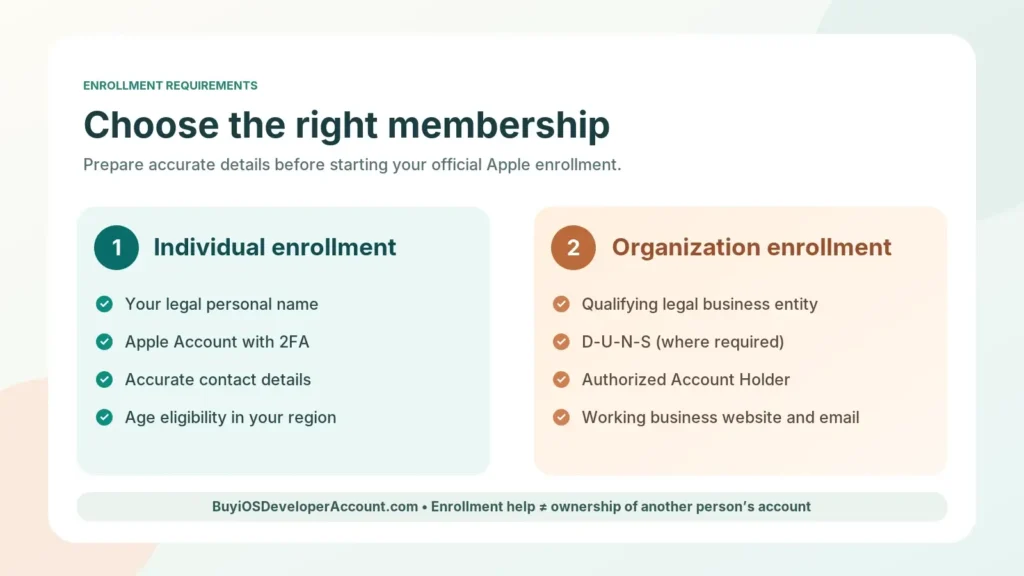
Individual Apple Developer Membership
An individual membership is intended for a person, including an eligible sole proprietor or single-person business. Apple uses your personal legal name as the App Store seller name. The applicant must meet Apple’s age requirements and provide accurate contact information. The Apple Account used for enrollment needs two-factor authentication.
This route can work well for indie developers, students publishing their first product, freelance creators, and founders experimenting with a personal project. An individual membership can also invite additional users to App Store Connect—Apple currently describes up to 50 extra users—but those users do not become full members of an organizational developer team. That distinction is easy to miss.
Organization (Company) Apple Developer Membership
An organization membership is designed for a qualifying legal entity, such as an incorporated company. Apple checks the legal name, legal status, authority of the person enrolling, and usually a D-U-N-S Number. It also expects a publicly accessible company website and organization-associated work contact details. Government entities have some different verification requirements.
The organization’s legal name normally appears as the seller on the App Store. Organization teams can invite members with assigned access and developer program resources. This option typically makes sense if a registered business should own the product, hire staff, work with agencies, or publish apps under a lasting brand.
| Decision factor | Individual | Organization |
|---|---|---|
| App Store seller name | Personal legal name | Verified legal entity name |
| Appropriate applicant | Individual or eligible sole proprietor | Qualifying legal organization |
| D-U-N-S Number | Not ordinarily required | Generally required (exceptions apply) |
| Team collaboration | App Store Connect access can be delegated | Organizational developer team and App Store Connect roles |
| Standard Apple membership price | Generally $99/year | Generally $99/year |
| Best fit | Personal publishing and solo projects | Business-owned apps and formal teams |
Practical advice: If the app belongs to your company, avoid publishing it under an unrelated person’s individual account just because the process appears faster. Future access, payments, updates, and transfers can become difficult. Apple’s enrollment requirements explain which legal details are needed for each account type.
How to Get an Apple Developer Account: 8-Step Enrollment Guide
The following workflow focuses on legitimate enrollment in your own name or that of your eligible organization. The exact screens can change, and additional verification may be requested, but these steps give you a reliable starting plan.
Step 1: Identify the Legal Publisher of Your App
Decide whether the App Store seller should be you or your company. If you are an agency building for a client, discuss account ownership before coding and publishing begin. In many cases the client should be the legal publisher while the agency receives appropriately limited access to perform its work.
Write down the intended seller name, the person authorized to accept contracts, and who will maintain the account after launch. Getting these decisions right early makes renewals and future app management simpler.
Step 2: Prepare Your Apple Account and Enable Two-Factor Authentication
Use an Apple Account you control, with accurate personal details and working recovery options. Apple requires two-factor authentication for enrollment. Do not use a seller’s disposable email, unfamiliar trusted device, or a shared login whose recovery details are controlled by another party.
Confirm that the phone number, email address, and legal name match the identity you will submit. If you are applying for an organization, use work contact details where appropriate. A small mismatch may create questions that slow verification.
Step 3: Collect the Right Identity and Business Documents
For individual enrollment, prepare your legal name and accurate address and contact information. Apple may request additional identity verification depending on the application and enrollment method.
For organization enrollment, prepare your entity’s registered name, business address, contact phone number, domain-associated work email, operational website, and D-U-N-S Number where required. The person enrolling must have authority to bind the company to Apple’s legal agreements. Apple does not treat an unregistered trade name as a substitute for a legally recognized organization.
Step 4: Start Official Apple Developer Program Enrollment
Go to Apple’s Become a member page and select the enrollment route that fits your situation. Depending on eligibility and region, you may enroll via the website or supported Apple Developer app workflow. Enter details carefully, choose the correct membership type, and follow any requests to confirm information.
Read the terms you will be accepting. Apple’s agreement defines the obligations of the Account Holder, access restrictions, and distribution responsibilities. A consultant can explain the process, but they cannot independently waive Apple’s eligibility rules.
Step 5: Complete Identity or Organization Verification
Apple may check the submitted identity, business registration, contact numbers, and authorization. For a company, legal records and the D-U-N-S listing should be consistent. If your business is newly registered, allow time to confirm or update external business records before planning a fixed app release date.
There is no trustworthy blanket guarantee that everyone will be approved in an hour or within a particular number of days. Respond promptly if Apple asks for clarification, and check official communication channels rather than following unexpected messages requesting passwords or verification codes.
Step 6: Accept the Agreement and Pay the Official Membership Fee
Once the application reaches the appropriate stage, Apple asks the applicant to accept its developer agreement and complete the membership purchase. The standard price is US$99 per membership year, with local-currency amounts in some regions. Eligible nonprofits, accredited educational institutions, and government bodies may qualify for a fee waiver.
Payment is a membership expense, not an App Store approval fee. The payment also does not guarantee that a particular app will pass review. Keep documentation of the membership purchase and record the renewal responsibility so the team does not lose access unexpectedly. Source: Apple enrollment and payment.
Step 7: Configure App Store Connect and Your Team
After your membership becomes active, sign in to App Store Connect. Review pending agreements and use its Users and Access section to invite people who need specific roles. Developers, app managers, support staff, and finance personnel usually require different permissions. Do not give broad administrative access just to make a small task easier.
If you plan to sell paid apps or offer in-app purchases, review the relevant paid applications agreements and provide the required tax and banking details. These business settings are separate from the annual developer membership fee. Apple describes the workflow in its App Store Connect guide.
Step 8: Create an App Record and Prepare for Distribution
Create an app record in App Store Connect before uploading your build. You’ll enter information such as the app’s name, primary language, platform, bundle identifier, and SKU. Then build and upload your application, check its processing status, add product-page information, and prepare a version for review.
Apple requires current agreements to be signed and the appropriate user roles to perform many of these actions. The official guide to adding a new app outlines the current record-creation process.
What Happens After Enrollment? The App Store Publishing Process
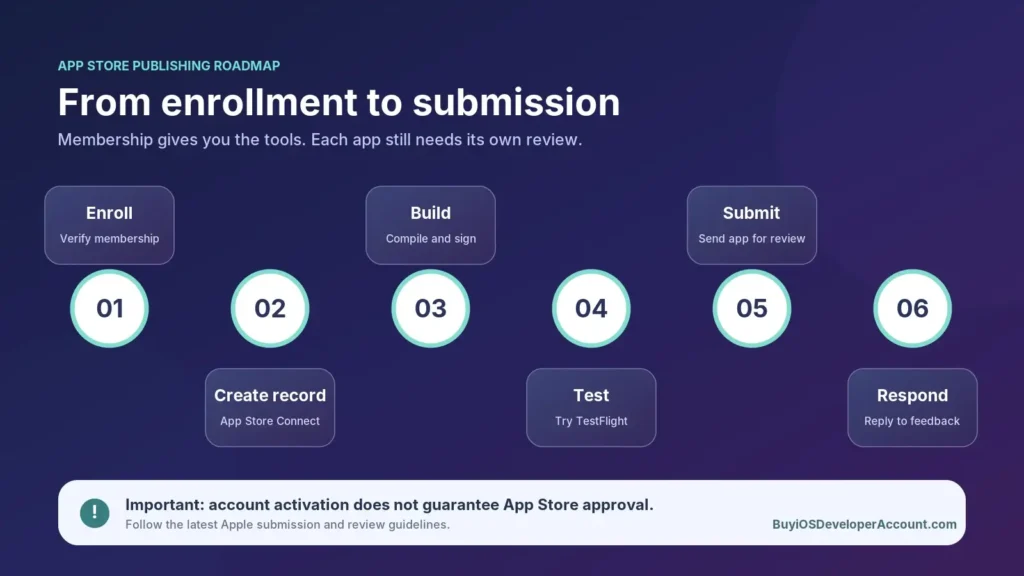
Getting the membership is only the first major milestone. The next stage turns your software into an App Store submission. Build an internal checklist so no one assumes that enrollment itself makes an app appear in search results.
Build and Sign the Application
Use Xcode and the signing configuration associated with your team. Check the target platforms, bundle identifier, supported devices, required capabilities, privacy behavior, and release build. An app that runs in the simulator may still have problems on real devices, so test the behaviors that matter to your audience.
Create the App Store Product Page
A useful product page communicates what the app actually does. Prepare a descriptive name, subtitle where applicable, clear description, correctly sized screenshots, category, age-rating information, support URL, and privacy disclosures. Avoid using trademarked brands in misleading ways or promising features the app does not provide.
When monetization is involved, review applicable App Store and payments rules. Set pricing and availability deliberately rather than treating default settings as final.
Test With TestFlight
TestFlight supports prerelease distribution to approved internal and external testers, subject to Apple’s testing rules. Use feedback to find crashes, accessibility issues, onboarding problems, subscription confusion, and device-specific behavior. A short but thoughtful beta period is often more valuable than immediately submitting an untested app.
Submit to App Review
Select the build you intend to release, finish the required metadata, and add the app version to a submission in App Store Connect. Then choose Submit for Review when ready. Apple evaluates the app under the current App Review Guidelines. Apps may be approved, rejected, or returned with requests for clarification; none of those outcomes can be guaranteed by an account seller or service provider.
The official Submit an app guide explains the submission controls. Once accepted, release timing depends on your chosen publishing settings and Apple’s processing requirements.
Apple Developer Account Cost vs Third-Party Service Packages
Searches such as “how to get an Apple Developer Account,” “buy Apple Developer Account online,” and “Apple Developer Account price” frequently mix two distinct items: Apple’s own membership fee and a third-party business’s advertised service or account package. They should never be presented as though Apple charges the same prices as a reseller.
Apple’s Official Membership Price
For the regular Apple Developer Program, Apple’s stated fee is US$99 per membership year, with regional differences where applicable. Both individual and eligible organization applicants generally pay the same standard program fee. This is separate from external assistance, consulting, development, or publishing support.
Package Prices Advertised by BuyiOSDeveloperAccount.com
At the time this article was prepared, the package prices previously listed by BuyiOSDeveloperAccount.com were:
| Advertised package | Listed price | Best question to ask before purchasing |
|---|---|---|
| Personal Account | $350 | Who is the legal member and what enrollment or support activities are included? |
| Company Account | $850 | Which legal entity is enrolled, who has signing authority, and what business support is covered? |
| Combo Package | $1,150 | What exactly is combined, how is access structured, and what is the renewal arrangement? |
Price transparency matters: These package prices are not Apple’s official membership rates, and a package name by itself does not establish what services are included. Confirm the current listed price, scope of service, identity verification duties, account holder, access model, support period, renewal costs, and any refund terms directly before making a purchase. If the offer involves purchasing someone else’s existing account credentials, review Apple’s applicable agreement first: authorization and ownership cannot be established merely by transferring a password.
For businesses with multiple apps, consider the total ownership and maintenance cost over several years rather than evaluating a package entirely by its upfront price.
Is It Safe to Buy an Existing Apple Developer Account?
Be cautious about offers that promise immediate transfer of an established account with someone else’s Apple Account credentials. Apple’s developer agreements restrict unauthorized sharing, resale, and access arrangements. A password handover is not the same as officially recognized legal ownership, and it may create security, continuity, contractual, and app-distribution problems.
There are legitimate workflows for inviting users to App Store Connect, changing the Account Holder under qualifying rules, and transferring eligible apps between developer teams. These are different mechanisms and should not be confused with buying a stranger’s membership. If your goal is to acquire an existing app, research Apple’s app-transfer requirements rather than asking the seller for their personal account login.
A legitimate external service can help explain requirements, organize documentation, or assist with app submission while the correctly authorized legal member retains ownership and control. Start with the Apple Developer agreements and ask any third-party provider to describe its access and ownership arrangements in writing.
What Documents Are Needed for a Company Developer Account?
Organization verification is a common source of questions for startups. Apple expects a qualifying legal entity, not merely an informal team, social media profile, or unregistered brand. Keep the information used for Apple enrollment aligned with your official business records.
Legal Entity Name and Business Address
Use the name under which the business can sign contracts and the address reflected in the relevant registration records. A trading name may be important for marketing, but it does not replace the legal entity Apple must verify.
D-U-N-S Number
Dun & Bradstreet issues D-U-N-S Numbers to business entities. Apple uses the identifier for most organization applications to help verify identity, legal status, and address. Your organization may already have a number; verify existing records before requesting a new one. Government organizations may have different rules. Follow Apple’s D-U-N-S guidance rather than paying an unverified intermediary simply to obtain a standard identifier.
Authority to Enroll
The person completing the enrollment must be authorized to bind the company to Apple’s agreement. An unrelated contractor who merely has access to an email address may not meet this requirement. Establish who the Account Holder should be, who can sign, and who will handle renewals.
Working Company Website and Contact Details
Apple specifies that an organization’s website should be publicly accessible and functional, with a domain associated with the company. A work email using the company domain helps make ownership and verification clearer. A placeholder page or mismatched contact details can create complications.
How Long Does It Take to Get an Apple Developer Account?
The timeline is not the same for every applicant. Individual verification can differ from organization verification. Company registration data, D-U-N-S details, the applicant’s authority, country-specific requirements, and Apple’s follow-up questions all affect timing.
Avoid promises of guaranteed same-day approval. Instead, build a realistic launch schedule around several independent checkpoints: collecting documents, submitting enrollment, receiving membership access, completing agreements, uploading a valid build, finishing metadata, and passing App Review. Approval of the membership is not approval of the app.
For a launch tied to marketing campaigns or customers, plan for unexpected requests and leave time to address them. If your application is delayed, review official notices and contact Apple Developer Support using the account’s authorized contact details.
Six Mistakes to Avoid Before Publishing Your First App
1. Choosing the wrong publisher. If the app belongs to a company, confirm whether the organization should enroll rather than placing it under an employee’s personal membership.
2. Treating a password as ownership. A login shared by an unrelated third party does not prove that Apple recognizes you as the Account Holder.
3. Assuming every Apple Account is a paid developer membership. Free accounts support learning and limited testing, but public App Store publishing normally requires program enrollment.
4. Confusing account approval with App Review. The membership and every submitted application are reviewed under different processes.
5. Skipping product-page and privacy preparation. Missing disclosures, screenshots, or necessary permissions can slow submission even when the binary itself works.
6. Ignoring renewals and responsible user access. A team needs clear ownership of two-factor authentication, legal agreements, payments, and role-based permissions—not a shared password in a group chat.
App Store Publishing Checklist for Beginners
Before you submit, work through this simple list. It helps turn a vague launch plan into a sequence with a clear owner for each action.
- Select individual or organization membership according to the legal publisher.
- Prepare accurate identity and company information, as appropriate.
- Enable two-factor authentication on the enrolling Apple Account.
- Enroll through Apple’s official process and accept the required agreements.
- Pay the applicable membership fee or complete an eligible waiver process.
- Confirm the Account Holder and invite other users with suitable roles.
- Create an App Store Connect app record with the correct bundle identifier.
- Build, sign, and test the release version on supported devices.
- Prepare screenshots, description, privacy details, support URL, and app review information.
- Complete any required paid-app, tax, or banking setup if monetizing.
- Upload a build, select it, and submit the app for review.
- Monitor App Review feedback, fix issues, and choose an appropriate release method.
- Schedule future maintenance, security checks, and membership renewal.
Frequently Asked Questions
How do I get an Apple Developer Account for App Store publishing?
Start at Apple’s official enrollment page, choose individual or organization membership, provide accurate verification details, accept the program agreement, and complete the membership purchase when eligible. After activation, use App Store Connect to prepare and submit your app.
How much does an Apple Developer Account cost in 2026?
The standard Apple Developer Program membership is generally US$99 per year, with possible regional pricing differences. Third-party package prices such as $350, $850, or $1,150 are separate advertised offers, not official Apple membership rates.
Can I publish my app without a paid developer membership?
You can learn and conduct some testing with a free Apple Account. Public App Store distribution generally requires an eligible membership in the Apple Developer Program.
Does Apple approve every app submitted by a paid member?
No. App Review assesses each submission under the applicable guidelines. Membership does not guarantee app approval, ranking, downloads, or revenue.
Is an organization membership more expensive than an individual membership?
The standard Apple program fee is generally the same for both. However, company formation, consulting, verification preparation, and other third-party support may add costs outside Apple’s membership fee.
Can I use an Individual Account for a freelance business?
If you are eligible to enroll as an individual or sole proprietor, it may be appropriate. The seller name is your legal personal name. If you have a separate qualifying legal entity and want that entity shown as the seller, review organization enrollment.
Does an individual developer membership allow other users?
Yes. Apple currently allows an individual member to invite up to 50 additional App Store Connect users. Those invited users do not receive the same broader program-team membership as organization team members.
Do I need a D-U-N-S Number for an individual membership?
Generally no. Apple’s D-U-N-S requirement concerns organization verification, with exceptions under its current rules.
How long will my membership remain active?
Standard paid membership is annual. Review your renewal date and payment arrangements so your publishing workflow remains uninterrupted.
Can I hire someone to submit my app for me?
Yes, you can work with a developer or consultant using properly authorized role-based access. Make sure the legal publisher retains appropriate ownership and control, and avoid sharing account credentials unnecessarily.
Can I transfer a live app to another developer account later?
Eligible apps can be transferred between App Store Connect accounts under Apple’s requirements. App transfer is different from selling another person’s Apple Account or handing over their password.
Where can I compare developer account service packages?
You can review the offerings advertised on the BuyiOSDeveloperAccount.com packages page. Confirm the current scope, legal ownership, access model, renewals, and support terms before any purchase.
Final Thoughts: Start With the Correct Publisher, Then Build Toward Release
Learning how to get an Apple Developer Account for App Store publishing is not just about purchasing membership. A dependable publishing setup begins with a real legal publisher, accurate verification, secure access, and a clear plan for preparing and reviewing the app. The right choice can make later updates, team changes, and business growth far easier.
For most solo creators, individual enrollment is the natural place to start. For a properly registered business, organization enrollment can offer the seller identity and team framework the business needs. In both cases, Apple controls its official enrollment and App Review decisions.
If you are exploring external help, compare Apple’s $99/year standard membership with the separately advertised packages at BuyiOSDeveloperAccount.com. Ask exactly which assistance you will receive, who will be legally responsible for the membership, and what happens after the first year. For details, see our account package options.